VIDEO MANAGEMENT SYSTEM
PRO WATCH VMS VIDEO MANAGEMENT SYSTEM
PRODUCT DESCRIPTION
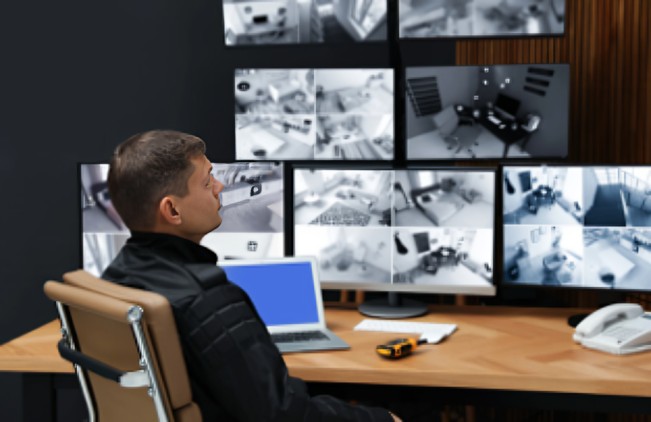
- Honeywell’s Pro-Watch VMS (Video Management System) controls multiple sources of video subsystems to collect, manage, and present video in a clear and concise manner. It intelligently manages the capabilities of each subsystem across various sites, enabling video management of analog or digital video devices through unified configuration and viewership. These subsystems include analog matrix switches or digital/network video recorders, allowing both analog and digital inputs to be viewed on analog or digital monitors. Users can leverage traditional analog and IP-network systems simultaneously, maximizing their initial investments. Subsystems range from Honeywell matrix switchers, DVR/NVRs, to third-party systems.
Honeywell’s Pro-Watch VMS (Video Management System) controls multiple sources of video subsystems to collect, manage, and present video in a clear and concise manner. It intelligently manages the capabilities of each subsystem across various sites, enabling video management of analog or digital video devices through unified configuration and viewership. These subsystems include analog matrix switches or digital/network video recorders, allowing both analog and digital inputs to be viewed on analog or digital monitors. Users can leverage traditional analog and IP-network systems simultaneously, maximizing their initial investments. Subsystems range from Honeywell matrix switchers, DVR/NVRs, to third-party systems.
Pro-Watch VMS supports cutting-edge technologies in the industry such as 4K resolution, H.265 smart video compression codec, multi-imager cameras, and fisheye cameras. Customers benefit from superior video quality with four times the detail of 1080p HD, reduced storage costs (up to 30-50% compared to H.264 compression), and seamless 180° and 360° surveillance capabilities. It seamlessly integrates with Honeywell equIP® series, 30 Series, and 60 Series IP cameras. Advanced camera features include “Click & Drag” 3D PTZ control, license plate recognition, intelligent event detection, and bounding boxes for specific video analytics, enhancing operational efficiency in protecting people, property, and services.
Pro-Watch supports VMS redundancy and 1+1/N+M NVR failover features. In case of equipment, system database, or network failures, the redundant and failover features ensure continuous system support with minimal interruption. Incidents are logged for future auditing and reporting purposes.
Pro-Watch VMS, combined with Honeywell’s Intelligent Command web-based platform and intuitive graphical interface, is a crucial component of the Pro-Watch Integrated Security Suite. It enables unified command and control with enhanced situational awareness features. The MAPS feature integrates with GIS/CAD for map navigation across sites, buildings, and floors, facilitating live view, playback, and alarm indication with camera and access device placement. Bulk camera firmware updates, password management features, and System Health Dashboards streamline facility management.
Pro-Watch VMS scales effectively from small to medium single instances to enterprise-level deployments supporting thousands of devices. It seamlessly integrates with other Honeywell security solutions including access control, intrusion detection systems, and advanced AI analytics, offering comprehensive security management capabilities.
MARKET OPPORTUNITIES
Pro-Watch VMS is designed for facilities needing to protect critical infrastructure at risk, such as airports, seaports, large multi-site commercial buildings, casinos, and other high-profile facilities. It serves as an ideal client-server video management solution for locations that utilize both digital and analog technologies.
Pro-Watch VMS products do not include content or materials from any companies or their subsidiaries prohibited under the US National Defense Authorization Act (NDAA) Section 889. They can be integrated into video systems that comply with NDAA Section 889 requirements.
PRO-WATCH® VMS Video Management System
FEATURES
- Scalable Security System for Flexible Deployment
- A single Pro-Watch Server supports numerous recording subsystems (NVR/DVRs).
Distributed architecture (parent-child topology) facilitates enterprise-style deployment, easily adding Child VMS server users & roles, workstations, sites, and partitions to the Parent VMS server via advanced discovery. - Open Integrated Platform for End-to-End Solution
- Auto-discovery of cameras connected to supported recorders.
Supports 60 series and 30 series cameras, edge storage, multi-imager, and explosion-proof cameras.
EquIP camera multicast stream reduces camera and network loading with live view on multiple clients.
Integrates seamlessly with Honeywell Pro-Watch® Access Control Systems for an integrated Access Control, Intrusion, and Video solution. - Redundant Server and Recorder Failover for 24/7 Operational Continuity
- Redundant server option increases system reliability.
1+1/N+M Pro-Watch NVR failover and failback automatically or manually. View and playback on one client panel. - Smart Search, Playback, and Clip Export for Efficient Forensic Investigation
- Investigate events and alarms by viewing alarm video at various stages (pre-alarm, on-alarm, post-alarm) simultaneously.
Commentable bookmarks for tagging scenes of interest in the timeline.
Search and find video through event view or timeline. Preview search allows viewing snapshots at various times.
Smooth reverse and synchronous playback across Pro-Watch NVRs.
Incident management mode allows creating packages of clips from multiple cameras at different times. - Intelligent Analytics for Proactive Threat Detection and Operational Efficiency Boost
- View intelligent events at the alarm panel and trigger event recording on Pro-Watch NVRs.
Annotation with bounding boxes on objects detected by IntrusionTrace and LoiterTrace for visual notification and verification.
Integration with Honeywell Video Analytics (HVA) and augmented vision face recognition analytics from Idemia and Ipsotek.
License plate recognition event management with detailed report generation using Honeywell VehicleTraceTM enabled cameras. - Powerful Desktop Clients for Enhanced Monitoring and Fast Response
- Create, save, and name salvos with up to 8×8 cameras under My Salvos or Shared Salvos.
Surrounding cameras mode with presets for efficient subject tracking.
Quick and responsive alarm actions from the preview pane.
Innovative “One-Click” or “Mouse Drag” 3D PTZ control for intuitive camera control.
360° de-warping for natural panoramic views.
Enhanced video viewing experience through an intuitive video rendering engine.
NVIDIA and Intel GPU based rendering support for H.264 and H.265 decoding up to 60 fps on 4K monitors. - Unified Mobile Apps
- Unified mobile apps for iOS® and AndroidTM for accessing cameras and doors on the move.
- Intuitive Graphical User Interface for Efficient Site Management
- User-friendly client interface to view video from numerous recorders.
Operators can log on using their local language and share video scenes via instant messages.
Role-based operator privileges and powerful macro programming for customization.
Supports active directory user authentication. - Effective Privacy Protection Options
- Body pixilation and blurring in live view for privacy protection.
4-eye dual user authentication for playback of original video.
Selective unmasking for clip export to anonymize faces selectively. - Architecture
- Based on client-server architecture for flexibility, customization, and integration.
Supports one-click migration from analog matrix systems.
Pro-Watch VMS client for monitoring and configuring video devices.
Pro-Watch VMS server with framework controller, database, and core components.
Pro-Watch® VMS Intelligent Command
Pro-Watch® Intelligent Command is a powerful web-based platform and intuitive graphical user interface which transforms the
video management experience to optimize security surveillance, enhance situational awareness and make properties more secure.
FEATURES
- Scalable Security System for Flexible Deployment
- Web-based application supports stand-alone and integrated video & access control systems.
Expandable thin client users for local or remote access.
Eliminates the need for firewall exceptions, IT support for software installation on workstations. - Intuitive Graphical User Interface for Efficient Site Management
- Integrated with Pro-Watch Intelligent Command’s web-based GIS/CAD maps.
Drag-and-drop camera setup, cross-site navigation, HTML5 live video pop-up, alarms/events, and instant playback for quick response.
Supports bulk camera firmware upgrades and password modifications through Intelligent Command.
System health dashboard for video devices and Healthy Buildings safety compliance. - Map Navigation for Viewing Security Status
- GIS online map support (OpenStreet Maps or other web-based maps).
Easy cross-site navigation with zoomable maps from global to local viewpoints.
Import multi-layered building floor plans for precise event identification.
Use existing CAD drawings/floor plans to reduce map engineering costs.
Devices placed on GIS or floor plan maps via drag-and-drop or map configuration. - Incident Workflow and Standard Operating Procedures
- Compliance with standard policies through customizable workflows.
Quick search and filter functionality for alarms or specific notifications.
Unified alarm management with details pane (acknowledgement, history, rollup).
Attach various forms of evidence to incidents securely.
Automatic documentation of incident workflow trails including location, time, evidence, comments, and procedures.
Generate incident report packages in PDF format for authorities. - Embedded Tools for Compliance Metrics and Device Management
- System Health Dashboard identifies device failures rapidly.
Healthy Building Dashboard provides metrics on occupancy, crowd estimation, mask detection, and social distancing violations.
Simultaneously accelerate firmware updates for multiple video devices.
Simplify device maintenance and password updates across multiple devices. - Cyber Security Features
- Enhanced password security with non-recoverable passwords, enforced complexity, expiry policies, and elimination of default passwords.
Addressed unauthenticated/unauthorized channels.
Secured firewall configuration.
Secured Web Client with HTTPS, TLS 1.2, protection from CSRF, and XSS attacks.
Restricted folder and Registry access for operators.
Secured assemblies with digital signing.
Secure communications using Honeywell proprietary protocol and TLS 1.2 encrypted video streams.
Support for Digest Authentication in multicast streams between camera and Pro-Watch VMS client.
Pro-Watch® VMS Video Management System
DIMENSIONS
PART NUMBER WORK LOOKUP
specifications
TABLE 1. RECOMMENDED HARDWARE SPECIFICATIONS
TABLE 2. RECOMMENDED WORKSTATION SPECIFICATIONS
TABLE 3. ORDERING INFORMATION
TABLE 4. PRO-WATCH/MAXPRO VMS - HARDWARE
TABLE 5. PRO-WATCH VMS RECORDER COMPATIBILITY
Request a Quote
Learn More From
Frequently Asked Questions
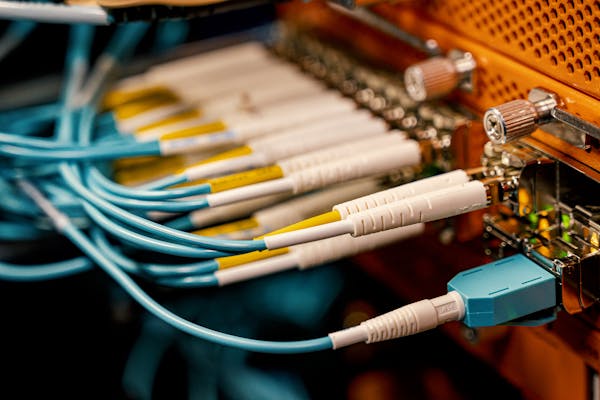
Multimode fiber commonly comes in 50/125 μm or 62.5/125 μm core/cladding dimensions, with bandwidth capacities ranging from 200 MHz to 2 GHz, depending on the grade. Multimode systems typically support transmission distances of up to 5 km, making them suitable for short- to medium-range applications.
In contrast, singlemode fiber—usually 9–10/125 μm—offers significantly lower attenuation and effectively unlimited bandwidth, supporting links over 150 to 200 km, especially when paired with optical amplifiers and advanced transceivers.
While singlemode fiber is less expensive per meter, its associated transceivers and equipment tend to cost more than their multimode counterparts. That said, singlemode devices are generally compatible with both singlemode and multimode fiber, whereas multimode equipment works only with multimode fiber.
Let me know if you’d like this turned into a quick-reference table or visual comparison—it’d make a solid inclusion for a fiber deployment guide.
The link budget is the difference between the transmitter’s output power and the receiver’s sensitivity. This budget must account for all signal losses along the path, including:
- Fiber attenuation due to the transmission medium
- Connector losses, such as those at patch panels or equipment interfaces
- Splice losses from mechanical or fusion joints
- Link margin, which provides a buffer for unforeseen variations
The link margin typically ranges from 2–3 dB in tightly controlled environments to up to 10 dB in more variable conditions. It is designed to accommodate:
- Component aging (e.g., light sources may degrade and lose up to 3 dB over time)
- Temperature variations affecting transmitter output or receiver sensitivity (up to 3 dB may be needed for thermal fluctuations)
- Physical cable damage and repair-induced losses (usually minor, but more relevant in harsh or industrial settings)
Always design your system for worst-case scenarios to ensure reliability. However, don’t overlook the best-case condition either—some optical receivers may exhibit erratic behavior if the incoming signal is too strong.
First, verify the optical signal strength along the link. Use an optical power meter to measure the received power at the fiber’s end point. Typical transmit levels range from –8 dBm to –15 dBm, while the receiver sensitivity is around –31 dBm, giving you a link budget of approximately 16 dB. This margin supports transmission distances of up to 10 km on singlemode fiber and about 3–5 km on multimode fiber.
If the measured power falls below the receiver sensitivity, there’s a strong likelihood of issues with the installed fiber. Ideally, initial OTDR readings should have flagged such faults.
If not, inspect the patch cords currently in use for possible defects or misalignment. A frequent oversight is the use of mismatched patch cords.
Multimode fiber types are classified by the ISO/IEC 11801 standard into five main categories: OM1, OM2, OM3, OM4, and OM5. Each type differs in core size, bandwidth, supported data rates, and maximum transmission distances. Here’s a quick breakdown:

- OM3 and OM4 are laser-optimized and widely used in modern data centers.
- OM5 supports shortwave wavelength division multiplexing (SWDM), enabling multiple wavelengths over a single fiber for higher capacity.
- All OM types are backward compatible in terms of connectors, but mixing core sizes (e.g., OM1 with OM3) can cause performance issues.