VIDEO MANAGEMENT SYSTEM
Honeywell’s MAXPRO VMS (video management system) controls multiple sources of video subsystems to collect, manage, and present video in a clear and concise manner. MAXPRO VMS intelligently determines the capabilities of each subsystem across various sites, allowing video management of analog or digital video devices through a unified configuration and viewer. The subsystems can be analog matrix switches or digital/network video recorders allowing both analog or digital input to be viewed on an analog or digital monitor. Users can benefit from using traditional analog systems and IP-network systems at the same time to ensure maximum use of their initial investments. These subsystems range from Honeywell matrix switchers, DVR/NVRs, and 3rd party systems.
MAXPRO VMS supports emerging technologies in the industry, like 4K resolution, H.265 smart video compression codec, multi-imager cameras, and fisheye cameras. Customers can fully utilize the advantages of superb video quality with 4 times the details over 1080p HD, 30%-50% less storage expense (when compared to H.264 compression), and seamless 180° and 360° surrounding surveillance. Furthermore, MAXPRO supports the native integration with Honeywell equIP® series IP cameras. The advanced camera features, like “Click & drag” 3D PTZ control, license plate recognition, intelligence events, and bounding boxes on objects detected by specific video analytics, help surveillance operators to efficiently protect people, property, and services.
MAXPRO has database redundancy and 1+1/N+M NVR failover features for unforeseen/maintenance scenarios in enterprise and critical infrastructure applications. Once there is a failure on NVR equipment, system database, or network, the redundant and failover feature can continue to support the system functions with minimal interruption. Incidents will be reported in a system log for future auditing and reporting.
Control of MAXPRO VMS can be through a traditional joystick controller, mouse, or even through a third-party interface. The extremely powerful rules engine (Macro’s) allows customization of the system to respond and control in the best possible manner for the application.
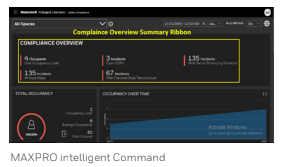
With MAXPRO VMS R670, a new Intelligent Command Web Client is introduced, offering intuitive map navigation across sites, buildings, and floors, and camera live view pop-up, instant playback, and alarm indication on maps. It also includes bulk camera firmware and password updates, and a new System Health Dashboard for video devices such as recorders and cameras, which enables customers to obtain situational awareness and manage their facility efficiently. A new Safety Compliance Dashboard for Healthy Buildings KPI’s provides the ability to view compliance and incidents from a single view.
MAXPRO VMS is highly scalable, so users can easily expand their video surveillance network from small to medium single instances to enterprise level supporting thousands of devices. Additionally, MAXPRO VMS includes integration with Honeywell’s Pro-Watch® security management system, Active Alert®, and People Counter video analytics, as well as other Honeywell products and solutions. The feature-rich user interface truly offers a unified management platform across many disparate systems to further embody Honeywell’s concept of “Learn One, Know Them All.”
MARKET OPPORTUNITIES
MAXPRO VMS is an ideal solution for facilities requiring robust protection of at-risk critical infrastructure, including airports, seaports, large multi-site commercial buildings, casinos, and other high-profile facilities. It serves as a comprehensive client-server video management system designed for locations that need to integrate both digital and analog technologies seamlessly.
FEATURES
Scalable Deployment:
- Supports numerous recording subsystems (NVR/DVRs) on a single MAXPRO Server.
- Distributed architecture with Parent-Child topology for enterprise-level deployments, allowing easy addition of Child VMS servers, Users & Roles, Workstations, Sites, and Partitions through advanced discovery.
Open Integrated Platform:
- Auto-discovery of connected cameras across supported recorders.
- Support for Honeywell H.265, multi-imager, and explosion-proof cameras.
- EquIP camera multicast stream support for reduced camera and network loading during live view on multiple clients.
- Integration with Honeywell Pro-Watch® Access Control Systems for integrated security solutions.
Redundancy and Failover:
- Redundant server options for increased system reliability.
- 1+1/N+M MAXPRO NVR failover and failback features ensure operational continuity during unforeseen maintenance scenarios.
Smart Search, Playback, and Clip Export:
- Advanced investigation capabilities with simultaneous viewing of alarm video across different stages (pre-alarm, on-alarm, post-alarm).
- Commentable bookmarks for tagging scenes of interest and quick retrieval.
- Efficient video search through event view or timeline, with preview search options for rapid scene identification.
Intelligent Analytics:
- Integration of Honeywell Video Analytics (HVA) for proactive threat detection.
- Annotation features with bounding boxes for visual notification and verification in live view and playback.
- Support for Augmented Vision Face Recognition Analytics and License Plate Recognition for enhanced security operations.
Powerful Desktop Clients:
- Enhanced monitoring capabilities with support for up to 8×8 camera salvos.
- Surrounding cameras mode for efficient subject tracking.
- Quick alarm actions and innovative “One-Click” or “Mouse Drag” 3D PTZ control for intuitive camera manipulation.
- GPU rendering support for smooth video display on 4K monitors, reducing workstation requirements.
Intuitive User Interface:
- Intelligent Command’s Web-based maps for easy camera setup and cross-site navigation.
- System Health Dashboard and Safety Compliance Dashboard for proactive management of video devices and building KPIs.
- Role-based operator privileges and support for multiple languages.
Privacy Protection and Compliance:
- Features like body pixilation and blurring in live view to protect privacy.
- 4-Eye dual user authentication for secure playback access.
- Selective unmasking for privacy-compliant clip export.
MAXPRO VMS provides a comprehensive solution for managing video surveillance across diverse environments, ensuring operational efficiency, security, and compliance.
ARCHITECTURE
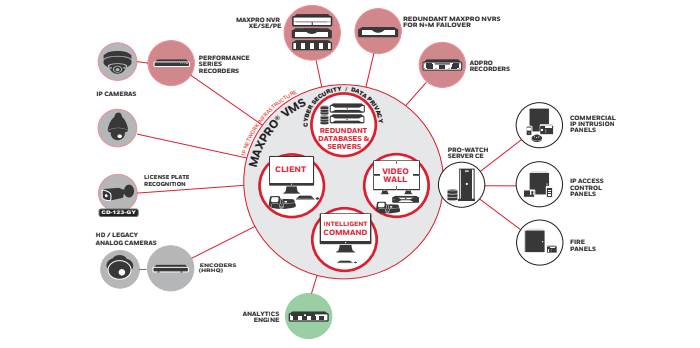
MAXPRO VMS is built upon a robust client-server architecture that emphasizes flexibility, customization, and seamless integration. This architecture supports a wide array of operational needs and features essential components to ensure effective video management:
At its core, MAXPRO VMS employs a client-server model designed for scalability and adaptability across diverse infrastructures. This setup enables straightforward migration from analog matrix systems to digital solutions with just a single click, preserving existing investments while embracing modern technology.
The MAXPRO VMS client plays a pivotal role by facilitating real-time monitoring and configuration management of video devices such as cameras, monitors, and keyboards. It provides an intuitive interface that empowers users to efficiently oversee multiple sites and swiftly respond to incidents.
Complementing the client-side functionality, the MAXPRO VMS server comprises critical components including the framework controller and database. These components ensure seamless system operations, robust data management, and high-performance video processing.
Overall, MAXPRO VMS leverages its sophisticated client-server architecture to deliver a comprehensive video management solution, enabling organizations to enhance security, streamline operations, and maximize the value of their surveillance investments.
Cyber Security Features:
Enhanced password security: Implementation of non-recoverable passwords, enforcement of complex password policies, regular password expiry, and elimination of default passwords.
Addressed Unauthenticated/Unauthorized channels: Measures to prevent unauthorized access and ensure all communications are properly authenticated.
Secured firewall configuration: Configuration of firewalls to safeguard against unauthorized access and ensure only legitimate traffic can enter or leave the system.
Secured Web client: Utilization of HTTPS and TLS 1.2 protocols to encrypt communications between clients and servers, along with protections against Cross-Site Request Forgery (CSRF) and Cross-Site Scripting (XSS) attacks.
Restricted folder and Registry access: Limitation of access to system folders and Registry entries to authorized operators only, preventing unauthorized modifications.
Secured Assemblies: Digital signing of software components to ensure their authenticity and integrity, protecting against tampering and unauthorized modifications.
Secure communication with equIP Cameras: Utilization of Honeywell’s proprietary protocol and TLS 1.2 encrypted video streams for secure communication between MAXPRO VMS and equIP Cameras, ensuring data confidentiality.
Support for Digest Authentication: Implementation of Digest Authentication in multicast streams between cameras and MAXPRO VMS clients to verify the identities of communicating parties and prevent unauthorized access.
These cyber security measures collectively enhance the overall security posture of MAXPRO VMS, safeguarding against potential threats and vulnerabilities in video surveillance environments.
ORDERING INFORMATION
specifications
RECOMMENDED HARDWARE SPECIFICATIONS