
VIDEO MANAGEMENT SYSTEM
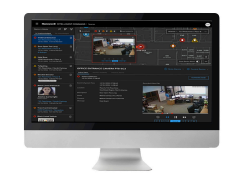
Focus more on business outcomes, worry less about security needs with Honeywell Pro-Watch software.
PRO-WATCH INTEGRATED SECURITY SUITE combines the power of Pro-Watch Access Control, Pro-Watch Intelligent Command, and Pro-Watch VMS to deliver information-driven insights through a unified dashboard. System tools include system health dashboards, bulk firmware and password updates, lowering operational costs and enhancing operator efficiency. A unified view of alarms on maps and customizable salvo views improve situational awareness. Automated operating procedure workflows reduce compliance and operational costs. Leveraging existing infrastructure, Pro-Watch Integrated Security Suite also reduces total cost of ownership.
Additionally, Pro-Watch Integrated Security Suite uses customer system data for proactive diagnostics, aiding in accurate budgeting for maintenance costs. Regional regulations pose daily challenges for security teams; Pro-Watch automates compliance to mitigate risks of fines. Automated workflows allow security operators to focus on daily needs rather than compliance activities.
The suite’s flexible architecture ensures 24×7 availability with industry-leading installation and lifecycle costs. Its user-friendly design blends functionality and configurability with intuitive operation, requiring minimal training. Embedded system tours guide new operators, enabling effectiveness within 10 minutes, eliminating the need for costly on-site training.
Situational awareness is crucial; Pro-Watch Integrated Security Suite employs AI to analyze data from multiple systems, identifying anomalies. Detected incidents are pinpointed on building maps, triggering incident workflows and SOP execution. All incident-related actions are archived for analysis and external review.
Pro-Watch offers comprehensive options for audit and reporting, addressing forensics, compliance, and business intelligence data mining needs.
PERFORMANCE FEATURES AT A GLANCE
- Web Based Client for Badging, Reporting, Alarm, and Event Monitoring
- Mobile Client for Badging, Badging Verification, and Door Control
- Server support including Windows Server 2012/2016/2019, Windows 10 (32-bit and 64-bit), SQL Server 2014/2016/2019
- Single user interface for multiple security and business functions
- Honeywell Software Development Kit (HSDK) and Pro-Watch can integrate with other building systems such as secondary fire, lighting, heating, ventilation, and air conditioning
- Web Services API enables Integration to third-party systems and Active Directory
- Certification Management
- Event/action associations including sending emails, running a stored procedure, or triggering a panel I/O point
- Pro-Watch-level triggered events for panel-to-panel and panel-to-software actions or within a panel for local actions
- Advanced Reports
- Support for Microsoft Azure
- Virtualization support for VMWare and Microsoft Hyper-V
- HID Origo Integration
- Compliance Reports that offer data and statistical reporting; auto-generated reports upon schedules
- Easy system setup and maintenance with user-definable hardware templates
- Database partitioning and definable operator permissions
- Mercury Series 3 Controller
- Mercury M5 (CASI) and MS Bridge (Software House) Controller
- Lite, Professional, Corporate, and Enterprise editions
The reporting application includes basic report templates and the capability to generate custom reports exported as XLS, CSV, and PDF formats. Pro-Watch provides a solid and proven security management solution. It is successfully deployed in enterprises of various sizes and across vertical platforms such as intelligent campuses, government facilities, and critical infrastructure.
Additional licensed features include:
- Alarm roll-up on maps
- GIS maps implementation
- System health dashboards for access devices
- Exporting incidents as PDF
- Bulk firmware and password updates for non-Honeywell cameras
SMALL SYSTEMS: PRO-WATCH LITE AND PRO-WATCH PROFESSIONAL EDITIONS
Pro-Watch Lite Edition (PWLT) and Pro-Watch Professional Edition (PWPE) are optimized for the needs of smaller security systems. These editions leverage Microsoft SQL Express 2019, allowing the server to be hosted either on a workstation for a single PC or on a separate server. In either case, additional clients can be connected to the server up to supported limits. Refer to the specifications guide on page 5 for more details.
Pro-Watch Lite Edition offers basic functionality for small offices and includes Pro-Watch PW Series access controllers. Up to four total client licenses can be added as needed.
Pro-Watch Professional Edition is ideal for sites requiring more than 32 readers or up to 6 client workstations.
MEDIUM & LARGE SYSTEMS: PRO-WATCH PROFESSIONAL AND PRO-WATCH CORPORATE EDITIONS
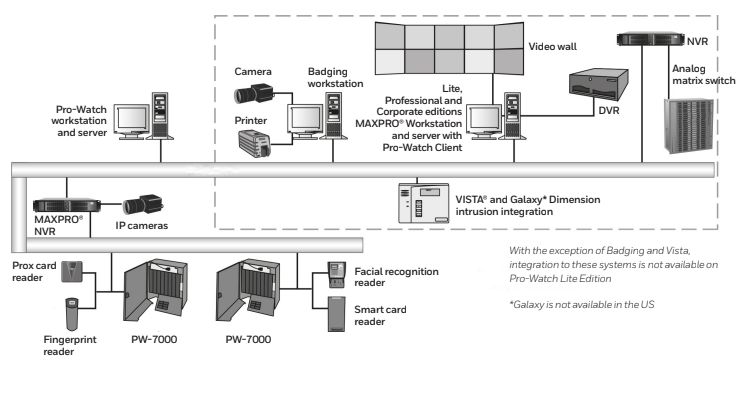
Both Pro-Watch Professional Edition (PWPE) and Pro-Watch Corporate Edition (PWCE) are designed to meet the needs of medium to large installations.
Figure 1. Integrations available using Pro-Watch
ENTERPRISE SYSTEMS: PRO-WATCH ENTERPRISE EDITION
The Pro-Watch Suite offers base software licenses that cater to security needs from small sites to global enterprises:
PRO-WATCH LITE EDITION: Provides basic functionality for small offices, supporting up to 32 doors on PW-Series panels.
PRO-WATCH PROFESSIONAL EDITION: Offers complete security functionality with more options for medium-sized organizations, supporting up to 64 doors. Ideal for organizations needing integrated processes or regulatory compliance.
PRO-WATCH CORPORATE EDITION: Delivers complete security solutions for larger organizations and campuses. Includes additional high availability options, making it suitable for organizations requiring 24/7 business continuity plans for their security systems.
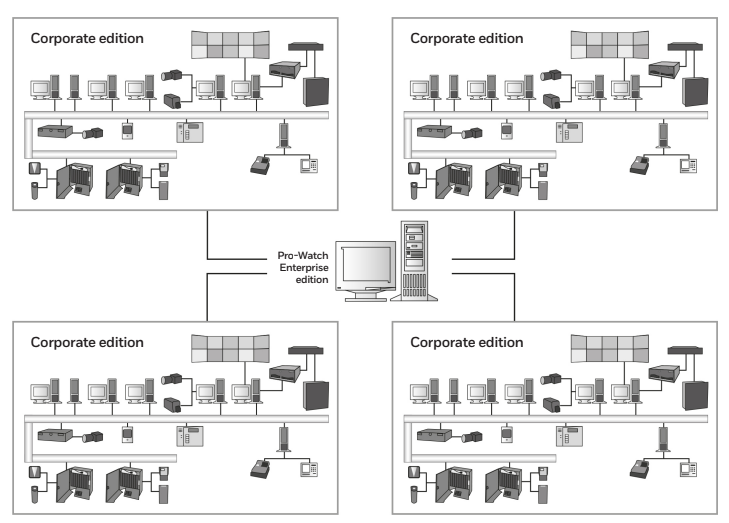
PRO-WATCH ENTERPRISE EDITION: A global security system that integrates multiple Pro-Watch Corporate Edition systems to efficiently manage badge holder data and report on events across the organization. Includes business continuity plans for the security system.
specifications
Table 1. Pro-Watch 5.5 specifications
1 Must have a standard client license on a machine in order to run an Advanced Badging client license.
2 Must order one regional server in an Enterprise system for each PWCE server in the system.
Enterprise systems link together two or more Corporate edition systems to share badgeholder identities and events
among the Corporate edition systems.
Table 2. Pro-Watch 5.5 Specifications
PRO-WATCH CLIENT WORKSTATION SPECIFICATIONS
PRO-WATCH SERVER SPECIFICATIONS
System Classification Criteria:
- Small System: Less than five clients, no more than 128 online readers, fewer than 5000 historical events per day, and regular database maintenance.
- Large System: Between 5000 and 50,000 historical events per day, between 128 and 512 online readers, between 5 and 15 client workstations, and regular database maintenance.
- Custom Sizing: If exceeding 50,000 events per day, exceeding 512 online readers, exceeding 15 client workstations, or using Pro-Watch server-side functions like anti-passback, event triggers, procedures, real-time data transfer utility, HSDK, etc., consult Honeywell for custom server sizing.
RAID Technology for Larger Systems:
- RAID technology involves setting up multiple physical disks:
- Disk Set 1: Operating system installed on RAID1 mirrored set (single disk).
- Disk Set 2: Database and storage on separate disk using RAID 5 or RAID 10.
- RAID technology involves setting up multiple physical disks:
Estimating Database Storage Space:
- Badgeholder Storage: Number of badgeholders x 75 KB (based on typical picture size).
- Event History Storage: Number of events per day x 2.5 KB x number of days to retain.
- Audit History Storage: [(Number of cardholder changes per day) + (Number of system configuration changes per day) + (Number of events per day) + (Number of operator system changes per day)] x 1.2 KB x number of days to retain.
Database Backup Recommendations:
- Honeywell recommends using removable media for daily database backups.
- Store backups securely off-site to ensure data recovery in case of system failure.
- Honeywell suggests two or more removable media per server or engaging in network backup programs with IT groups.
Important Notices:
- Server and workstation hardware guidelines serve as references and are subject to changes due to market conditions, software updates, manufacturing changes, and other variables.
- Plan for system growth, expansion, operating system updates, database engine updates, end-user system expansions, historical data retention, and archive data storage requirements.
- Consult with Honeywell for assistance tailored to specific needs.
This information provides clear guidelines and recommendations for deploying and maintaining Pro-Watch systems based on system size and requirements.